Introduction
In 2026, WebGPU has become a browser standard. On-device AI inference has evolved from experimental research into production engineering practice. And TensorFlow.js — Google’s official browser-side machine learning framework — sits at the center of this transformation.
For frontend developers, this means one thing: building AI no longer requires Python, GPU servers, or even a backend. In between writing React or Vue components, you can run a real-time gesture recognition model right in the browser.
This guide cuts through the hype and tells you what TensorFlow.js can actually do, how to use it, and where the pitfalls are.

1. What Exactly Is TensorFlow.js?
The definition is simple: TensorFlow.js is the JavaScript port of TensorFlow that lets you complete the entire ML workflow — loading models, running inference, and even training — entirely in JavaScript within the browser or Node.js.
It has three core modules:
| Module | Purpose |
|---|---|
@tensorflow/tfjs
| Full version with training capability |
@tensorflow/tfjs-core
| Core engine + automatic differentiation |
@tensorflow/tfjs-converter
| Load models trained in Python |
The browser-side acceleration backends operate on three tiers:
1. WebGL (default) — GPU matrix operations, stable since 2018
2. WebGPU (primary from 2025+) — 2-3x performance boost over WebGL, lower power consumption
3. WASM (XNNPACK backend) — pure CPU fallback
Key point: In 2026, when you write TensorFlow.js code, 99% of the time it will run on WebGPU.
2. Practical Use Cases and Examples
2.1 Image Classification: The Classic Entry Point
```javascript
 import * as tf from '@tensorflow/tfjs';
 import * as mobilenet from '@tensorflow-models/mobilenet';

const model = await mobilenet.load();
 const img = document.getElementById('myImage');
 const predictions = await model.classify(img);
 console.log(predictions);
 ```
This code loads the MobileNet model in the browser and classifies an image. The model is about 4MB, cached to IndexedDB after first load — subsequent loads are instant.
Real-world applications:
– Auto-tagging product images
– User upload content moderation (NSFW filtering)
– Visual recognition on mobile cameras
2.2 Human Pose Estimation: High-Performance Frontend Apps
One of the most valuable capabilities in the TensorFlow.js ecosystem is human keypoint detection via MoveNet and PoseNet.
```javascript
 const detector = await poseDetection.createDetector(
 poseDetection.SupportedModels.MoveNet,
 { modelType: poseDetection.movenet.modelType.SINGLEPOSE_LIGHTNING }
 );

const video = document.getElementById('webcam');
 const poses = await detector.estimatePoses(video);
 ```
This scenario requires zero backend infrastructure — camera frames are inferenced frame-by-frame on the local GPU. Suitable for:
– Motion-based gaming (fitness, dance instruction)
– Remote rehabilitation posture correction
– Virtual backgrounds and gesture recognition in video conferencing
2.3 Text Classification and Sentiment Analysis
LLMs aren’t the only way to do NLP.
```javascript
 const model = await tf.loadLayersModel('/models/sentiment/model.json');
 const input = tokenize('The service at this restaurant was terrible');
 const prediction = model.predict(input);
 // => Negative sentiment, confidence 0.94
 ```
With a distilled TinyBERT model, running sentiment analysis in the browser takes less than 50ms per inference.
2.4 Anomaly Detection (Real-time Sensor Data)
IoT scenario: receive sensor data in the browser and detect anomalies in real time with TensorFlow.js.
```javascript
 const model = await tf.loadGraphModel('/models/anomaly/model.json');
 // Receive sensor data every 100ms
 setInterval(async () => {
 const tensor = tf.tensor2d([currentReading], [1, features]);
 const result = model.predict(tensor);
 if (result.dataSync()[0] > 0.9) {
 triggerAlert('Anomaly detected');
 }
 }, 100);
 ```
3. Where Do Models Come From?
This is the part most frontend engineers find confusing. Don’t worry — three paths:
3.1 Use Official Pre-trained Models (Simplest)
TensorFlow.js ships a set of ready-to-use models:
| Model | Feature | Size |
|---|---|---|
| MobileNet | Image classification | ~4MB |
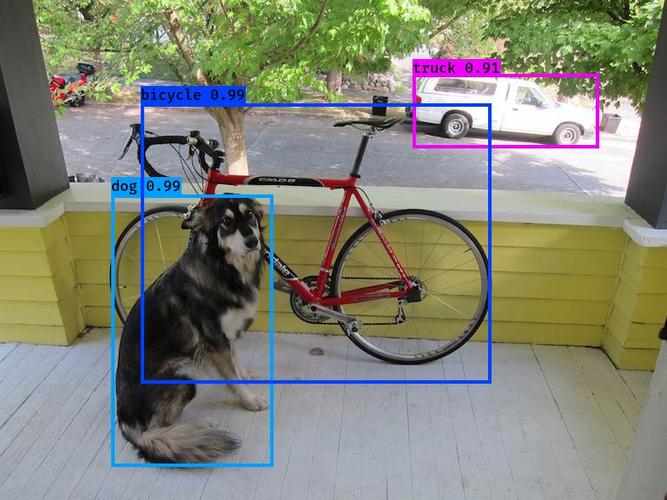
| COCO-SSD | Object detection | ~12MB |
| MoveNet | Pose estimation | ~3MB |
| BodyPix | Person segmentation | ~3MB |
| Speech Commands | Voice keyword detection | ~1MB |
Usage is nearly identical for all: `npm install @tensorflow-models/xxx`, then `model.xxx()`.
3.2 Convert from Python (Most Flexible)
Models you train in Python or download from Hugging Face can all be converted to TensorFlow.js format.
```bash
 # Python side
 pip install tensorflowjs
 tensorflowjs_converter
 --input_format=tf_saved_model
 /path/to/saved_model
 /path/to/web_model
 ```
The converter outputs a `model.json` file plus sharded `.bin` files. Put them on a CDN and load them from the frontend.
Practical advice:
– Keep total model size under 5MB — anything larger ruins first-load experience
– Use `tf.loadGraphModel()` to load computation graph models (faster inference, smaller size)
– Leverage IndexedDB caching to avoid re-downloading on every refresh
3.3 Train in the Browser (Uncommon but Interesting)
For small-scale scenarios, training can happen entirely in the browser:
```javascript
 const model = tf.sequential();
 model.add(tf.layers.dense({ units: 32, activation: 'relu', inputShape: [10] }));
 model.add(tf.layers.dense({ units: 1 }));
 model.compile({ optimizer: 'adam', loss: 'meanSquaredError' });

await model.fit(trainXs, trainYs, { epochs: 50 });
 ```
Suitable for: privacy-sensitive data, small-sample fine-tuning, personalized recommendations.
4. Engineering Pitfall Guide
Let’s be direct about the issues we’ve encountered.
4.1 WebGPU Compatibility
In 2026, mainstream browsers (Chrome 130+, Edge 130+, Firefox 130+) all support WebGPU, but Safari remains problematic.
Solution: Use `tf.ENV.set(‘WEBGPU_CPU_FORWARD’, true)` as a fallback, or check for `navigator.gpu` directly.
```javascript
 if (navigator.gpu) {
 await tf.setBackend('webgpu');
 } else if (tf.ENV.get('WEBGL_VERSION') >= 2) {
 await tf.setBackend('webgl');
 } else {
 await tf.setBackend('wasm');
 }
 ```
4.2 Memory Leaks
TensorFlow.js does not automatically GC tensors. Every call to `model.predict()` creates new tensor objects.
Mandatory practices:
```javascript
 const result = model.predict(input);
 // Dispose immediately after use
 result.dispose();
 input.dispose();

// Or use tf.tidy for automatic management
 const output = tf.tidy(() => {
 return model.predict(input);
 });
 ```
For larger models, memory leaks will crash browser tabs. This is not an exaggeration.
4.3 Model Loading Optimization
– Chunked loading: For models over 5MB, consider showing a loading progress bar
– Preloading: Start loading when the user hovers over a relevant button
– Offline support: Combine with Service Worker + Cache Storage
5. Practices Summary
When should you use TensorFlow.js?
– ✅ Real-time interactions (camera, sensors, user action feedback)
– ✅ Data must stay in the browser (privacy-sensitive scenarios)
– ✅ Reduce server costs (move inference to the client)
– ❌ Model is too large (>20MB) and user devices are old
– ❌ Fine-grained model training with parameter tuning
One golden rule: TensorFlow.js’s core value is inference deployment, not training. Train in Python, deploy with TensorFlow.js.
—
Citations
2026 Frontend Essential: TensorFlow.js, the AI Engine in the Browser — Juejin
WebGPU On-device AI Inference: 2026 Browser AI Breakthroughs and Practical Guide — Juejin
📖 Recommended Reading
I recommend checking out other articles
2026 AI Security Revelation: When Agents Wake Up, Is Your Defense Still Enough?
LangChain Introduction and Uses: The Swiss Army Knife for LLM Application Development
